Number of invoice lines
De standaard instelling is één factuurregel per boeking. Dit heeft als resultaat dat elke urenboeking een regel op de factuur wordt. Indien gewenst kan hier worden aangegeven of er één totaalregel moet worden gegenereerd of dat er groepering plaats moet vinden.
The default setting is one invoice line per booking. This means that each hourly booking becomes a line item on the invoice. If desired, you can specify whether to generate a single total line item or whether grouping should take place..
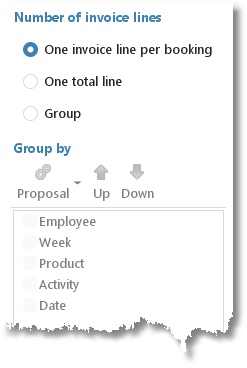
Grouping examples:
Group by Week: Every week will result in one invoice line.
Group by Week and Employee: Every combination of week and employee will result in one invoice line.
The order can be arranged using the Up/Down buttons.
Only when no grouping is set, all details (user fields for instance) can be used on the invoice line. Otherwise the available fields for selection depend on the grouping set. Grayed out fields are not selectable.
Invoice line template
At the invoice line template you can set which data must be used and how it will look like. This is set separately for all available invoicing scenarios (invoicing hours, the different task types, travel costs and expenses).
Click on Proposal to generate a default invoice line template using the grouping settings from above.
Click on Edit to edit the template.
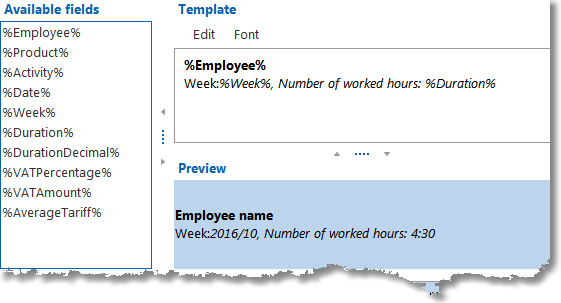
On the left side you can see the available fields. The template is on the right side. Here you can give the template a format (font style).
To add the fields to the template text you can drag & drop them. Below the template you can see an example of how it will appear on the invoice. It is also possible to add ordinary text, as in this example.
NB: The template will be used when generating new orders. A change of the template will only be effective to new orders.