You can send sales invoices via eConnect as follows:
1.Click Invoicing | Settings in the Module Explorer.
2.Click eConnect.
3.Create an account or sign in at eConnect.
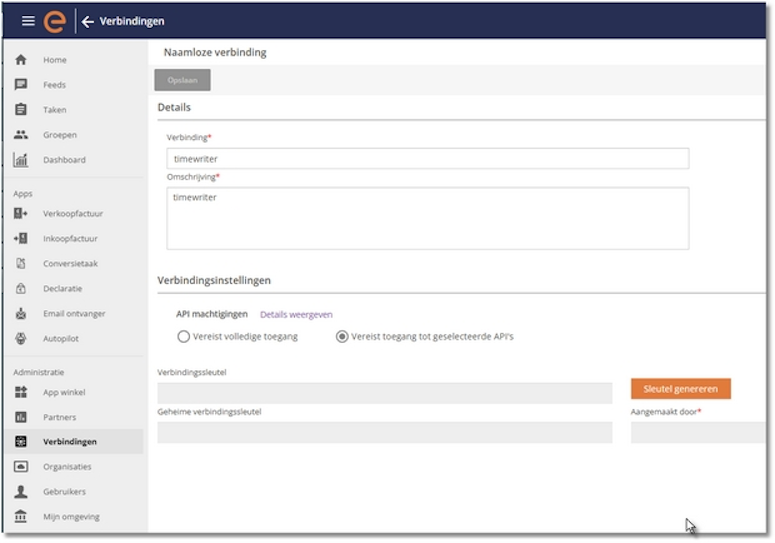
4.Select "Connections."
5.In the top right menu, you'll find your "own connection".
6.Then fill in the required fields (see the screen below).
7.Click "Start generating."
8.Transfer the generated keys to TimeWriter (Connection key = Customer key, Secret connection key = Customer secret).
9.After creating the connection and transferring the keys, find your organization under "Your eConnect ID".
N.B. For identification by eConnect, the customer's full address (street, postal code, and city), email address and the Chamber of Commerce number and/or VAT number are required.
These fields can be configured under: Invoicing | Settings | Customer data.
Peppol ID
Peppol is a European network for receiving and sending invoices. Invoices received via this network are automatically entered into your administration. More and more countries are adopting this method; in Belgium, it is already mandatory for every B2B invoice.
If the Customer key and Customer secret have been set in the eConnect settings, a Peppol Type and an ID/Number can be entered in the TimeWriter customer data. This data is required to determine, for each customer, how the addressee (customer) can be located via the Peppol network.
When entering or editing a customer, your business partners in the Peppol network can be found using the search button (behind the ID/number field), and the Type and ID can be transferred.